Citizens can locate the courthouse, check the sheriff’s office inmate roster, or verify tax details through the tax assessor portal; these offices are associated with 4 McGee Street, Greenville, SC 29601. The online property records search reveals deeds, parcel maps, and tax liens, while the probate court and jail inmate search pages may display current rosters, recent bookings, and release histories. The site also provides information about circuit court judges and their schedules in Greenville County SC.
Residents seeking additional information can find tools including GIS maps, voter registration forms, building permits, and road maintenance updates through relevant official websites, such as https://gcso.org/. Other topics include emergency management alerts, public library catalogs, economic development initiatives, health department clinics, fire rescue services, and senior services programs. Business licensing, zoning regulations, land records, juvenile court filings, marriage license office details, public transportation routes, environmental services, parks and recreation sites, COVID-19 testing locations, court calendars, and criminal case lookup information are also relevant to Greenville County SC.
How to Search Greenville County SC
Searches draw on county courts, the sheriff’s office, property offices, state agencies, and local governments. The sheriff portal serves jail custody, arrest, warrant, and sheriff-record requests, but it does not hold every county record. You can also access to review official records. Each court, tax office, recording office, and state agency controls its own files. The steps below show how to begin a search without treating one portal as a full county index.
Official Search Portal: https://gcso.org/
Steps to Search
- Open the sheriff portal and use its menu or site-search box for terms such as inmate, jail, arrest, warrant, or records. Menu wording may change as the site is updated.
- Select the current inmate or jail-search area. If the page sends you to a linked service, check that the link came from the official sheriff domain before entering personal data.
- Enter the exact legal name, date of birth, booking number, or other requested field. Use fewer search terms first if the form allows it.
- Open the matching entry and note the booking date, listed charge, custody status, booking number, and any release date shown on the record.
- Compare unclear names and dates with another official record before drawing a conclusion. A partial name match can refer to a different person.
- For a court, property, tax, election, vehicle, business, or vital record, move to the agency named in the department table below. The sheriff portal cannot supply records held solely by those agencies.
Inmate Search and Jail Records
The sheriff’s office controls jail custody data, while the court system controls charges, case status, and final case decisions. These records serve separate purposes and can show different stages of the same matter. Use jail records for custody questions and court records for legal case questions.
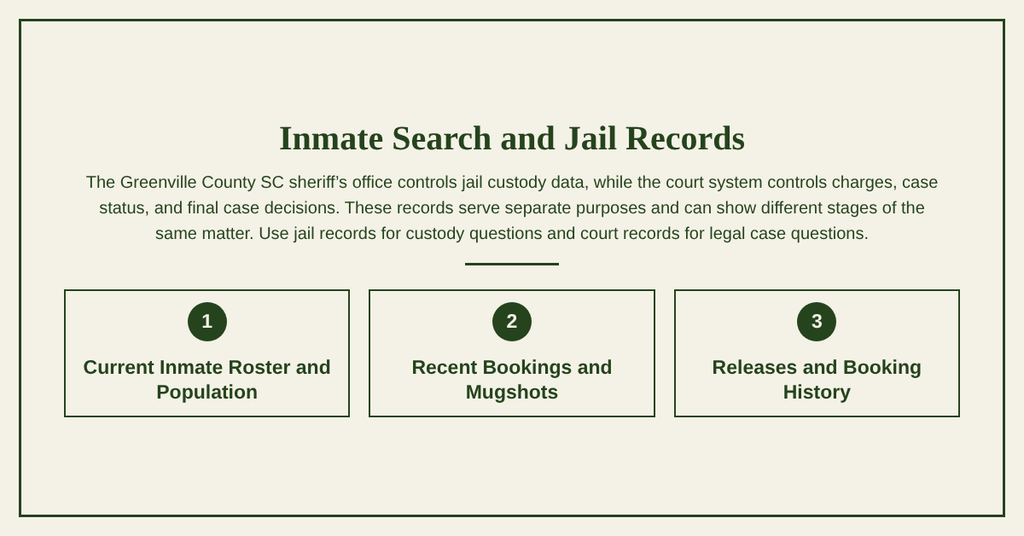
Current Inmate Roster and Population
A current inmate roster is a time-sensitive custody list rather than a fixed headcount. Entries may change after a booking, release, transfer, bond update, or court order. A population total taken from the roster can become outdated within hours, so record the date and time shown by the source.
Recent Bookings and Mugshots
Recent booking entries may show a booking date, booking number, listed offense, bond status, and booking photo. A mugshot records the person at the time of booking and does not establish guilt or prove a conviction. Some entries may lack a photo or display limited fields because of the booking stage.
Releases and Booking History
Release data may list the date, time, releasing agency, and type of release recorded by the jail. Wording can refer to a bond release, release order, transfer, or another custody action. Confirm the custody event with the sheriff’s office, then check the court case for any remaining hearing, warrant, or payment issue.
Arrests and Warrants
Arrest reports, warrant listings, and court cases are separate records created by different offices. An arrest entry marks a law-enforcement event; a court file shows the charges filed by a judge or prosecutor. A current status search should use the office that controls each record.
Arrest Records and Recent Arrests
A sheriff’s arrest record may identify the arrest date, place, reporting agency, listed reason, report number, and related court case. Recent-arrest listings can help a user confirm a reported event, but they may omit later actions. A lack of a listing can mean the data changed, fell outside the posted period, or belongs to another agency.
Active Warrant Search and Wanted Persons
An active warrant search can show whether the sheriff’s office lists a person as wanted at the time of the query. Warrant status may change after surrender, bond action, dismissal, or a court order. If the listing lacks a clear update time, confirm the status with the sheriff and the clerk of the court handling the underlying case.
Bench Warrants
A bench warrant is a court-issued order, often connected to a missed appearance or failure to follow a court rule. It may appear in a criminal case rather than a general arrest list. The court record controls whether such an order remains active, so do not treat an arrest posting alone as proof that a bench warrant still exists.
Criminal History and Background Checks
A criminal-history search may require a lawful purpose, especially when the result will be used to decide housing, employment, credit, or insurance. A county case search covers only courts in that county and may omit federal cases, municipal cases, and sealed matters. Consumers using a third-party search service should check how the company obtains and reports records under the Fair Credit Reporting Act.
Felony and DUI Records
Felony case status comes from the criminal court that filed the charge. DUI data may also involve the South Carolina Department of Motor Vehicles, which keeps driving and point records under a separate system. A court disposition and a DMV driving record answer different questions, so review both when a driving-related history is at issue.
Court Records
The South Carolina Judicial System holds filings for state courts, including Greenville County circuit and family courts. Users must select the correct court, county, case type, and sometimes a courtroom division. The circuit court judges and their assignments can be checked through the current judicial directory.
Case Search by Name or Case Number
A case-number search is usually the cleanest method because each number points to one court file. A name search may return several people with similar names, spelling differences, or multiple cases. Use the exact legal name shown on court papers and confirm the county and case type before opening a result.
Court Dockets, Schedules, and Hearings
A docket lists filings and procedural events, while a court calendar lists scheduled proceedings. Hearing dates can move because of continuances, witness changes, or court orders. The e-filing or case-search system may show the latest docket entry, yet participants should still follow notices issued by the court or clerk.
Criminal Court Records
Criminal court records may contain the filed charge, court dates, plea, disposition, sentence, and warrant status. Some documents stay in the courthouse and may not appear in an online index. A person listed as a defendant has not necessarily been convicted, so read the formal disposition rather than relying on the charge alone.
Civil and Family Court Records
Civil cases cover disputes such as contracts, property, money claims, and injuries, while family cases cover marriage, divorce, custody, and support matters. Family records can have privacy limits based on the case type and the age of the people involved. Greenville County SC juvenile court matters often have stricter access rules and should be handled through the proper court channel.
Probate and Estate Records
The probate court handles estate filings, wills submitted for probate, guardianship matters, and other assigned probate work. A case search may show the estate representative, docket, and court actions without exposing every private document. Before filing, a will may remain outside the public court index.
Traffic Court Records
A traffic citation can be handled by a municipal court, county court, or the court named on the ticket, based on where the stop occurred. The court record addresses the charge, appearance, and judgment. Payment, points, and driving eligibility can involve separate SCDMV records, so a closed court case does not by itself settle every driving question.
Birth, Death, and Marriage Records
Birth and death records are held through the South Carolina vital-records system, while marriage licenses come from the appropriate county office. Divorce decrees belong in family court. Each document has a different custodian, eligibility rule, and request process.
Birth and Death Records
South Carolina Department of Health and Environmental Control offices handle certified birth and death records connected to events occurring in the state. Certified copies can carry restrictions based on the requester’s relationship to the person named in the record. A family-search index may identify a likely record, yet it does not replace a certified copy.
Marriage Licenses and Divorce Decrees
The marriage license office is part of the county marriage-license process, with the clerk issuing the license before the ceremony. A marriage certificate confirms that the license was returned and recorded. A divorce decree is a separate court judgment issued after the case is processed, so the two documents answer different legal questions.
Genealogy and Historical Obituaries
Genealogy work can use indexed birth lists, death indexes, old newspapers, cemetery lists, family Bibles, and published obituaries. Individuals can also check criminal court records to verify relevant details. An obituary is a notice about a person’s death, not a certified death record. Researchers should cite the original record and treat obituary details as leads unless another record confirms them.
Property Records
Greenville County property research can involve several offices with separate duties. The Greenville County SC tax assessor and auditor maintain assessment data, the recording office holds deeds, and the treasurer handles many tax collections. The county clerk or recording office also receives instruments such as liens.
Property Search by Address or Owner
A GIS property search can start with an address, owner name, parcel number, or legal description. The result should show a map shape, parcel number, owner name field, and assessment data tied to the tax record. Owner names may differ from a person’s everyday name because of deeds, trusts, companies, or recorded legal names.
Deeds, Titles, and Parcel Maps
A deed record identifies parties, dates, consideration, and a legal description of the land. Parcel maps place those descriptions on a tax map, but a tax map is not always a boundary survey. A title company, attorney, or licensed surveyor may be needed to verify easements, encroachments, acreage, or exact property lines.
Property Tax Records and Tax Liens
Assessed value, taxable value, millage, and amount due can differ from a property’s market value. Delinquent tax data shows the tax account status; it does not always prove that a recorded lien has been filed. A title lien comes from the recording office, so both the tax account and recorded instruments should be reviewed.
Police and Incident Reports
Police incident reports come from the agency that investigated or responded to the event. A sheriff’s report, city police report, state agency report, and court citation can describe the same event but serve different purposes. Report availability depends on the agency, investigation status, request format, and applicable state law.
Police Reports and Incident Blotter
A police report may require a report number, involved person, date, location, and proof connected to the request. Public incident logs usually contain fewer facts than full reports. A call for service does not always prove that a crime occurred, and some reports remain restricted during an investigation.
Traffic Violation Records
A traffic violation record may appear in a court file, a law-enforcement report, or both. The citation or court case addresses the alleged violation and final finding. The report may describe the stop, while the court controls the case outcome, so each record should be read for its own purpose.
Accident and Crash Reports
State-reportable crash records can be requested through the South Carolina Department of Motor Vehicles using the agency’s report process. A crash report records reportable facts such as the crash, parties, and insurance details; it may not assign legal fault. A separate police narrative or court case may address disputed facts.
People and Phone Search
Public offices publish contact details for employees and agencies, but they do not create a complete countywide list of every resident. Personal addresses, phone numbers, and relatives should come from lawful records or direct consent. Public data is most reliable for verifying an agency, business, elected office, or court.
Person and Residents Directory
No directory provides every resident’s current address and phone number as a public database. Voter registration files, professional licenses, and other registries have set purposes and privacy rules. A search result can be outdated, so confirm a current address through the person or an approved organization before relying on it.
Reverse Phone Lookup
A reverse phone lookup uses published business listings, caller-ID records, or commercial databases to identify the reported owner of a number. These results can be stale, incomplete, or wrong because numbers may be reassigned. Treat a result as a lead and compare it with an official business directory before sending money or personal data.
Public Office Contact Details
Use official agency websites and elected-office directories to verify public contacts. County offices often serve residents, courts, municipal offices, state agencies, and special districts through different numbers. A contact found on an unofficial page may belong to a former worker, another county, or a private business with a similar name.
Vehicle Records
Vehicle registration and title records are controlled by the South Carolina Department of Motor Vehicles rather than the county sheriff or county clerk. Requests can require the owner’s name, plate, VIN, record type, and a permitted reason for the request.
License Plate and VIN Lookup
A license plate identifies a vehicle for public use, but it does not make the registered owner’s personal data open to everyone. A VIN lookup or plate request may be limited by state law and DMV rules. Do not use a public-results website to compile private ownership data without a valid purpose.
Vehicle Registration and Title Records
A registration record may show current plates, renewal status, and registration history. A title record documents ownership transfers and may contain lien information. DMV request forms, identification, fees, and supporting documents depend on the selected record and requester, so check the current SCDMV instructions before filing.
Business Records
Business entity and financing records come from the South Carolina Secretary of State, not the county assessor or sheriff. County offices may handle local business licenses or zoning, which are separate from state incorporation records. Search each record system for the fact you need.
Business Search and Entity Lookup
The South Carolina business search can show legal names, formation dates, filing numbers, registered agents, and entity standing. Similar trade names may belong to unrelated companies, so compare the exact legal name and filing number. A search result alone does not prove that a company is active in every county or has a local license.
Assumed Name DBA Filings
An assumed-name filing, often called a DBA, can show that a business uses a trade name different from its legal entity name. The filing does not create a new corporation or replace the underlying entity record. A city or county business-license check may still be needed for a Greenville location.
UCC Records and Liens
Uniform Commercial Code filings can identify a debtor, secured party, collateral type, and filing date tied to a commercial transaction. A UCC filing is not the same as a county property lien, judgment, or mortgage. Use exact party names and county data when searching because business names may differ from legal names.
Public Records and Government Requests
South Carolina’s Freedom of Information Act provides a process for requesting records held by public bodies. The South Carolina Freedom of Information Act, S.C. Code Ann. § 30-4-10 et seq., applies within set limits, including exemptions for certain law-enforcement and investigative records. The agency holding the record decides the request process and response.
Open Records and FOIA Requests
Write the request to the public body that holds the record and identify the subject, date range, people, report number, or requested format with enough detail for retrieval. You can also consult to locate official filings. The requester may need to clarify broad or ambiguous requests. A public body can apply an exemption or charge a permitted fee, and it does not have to create a record that was never made.
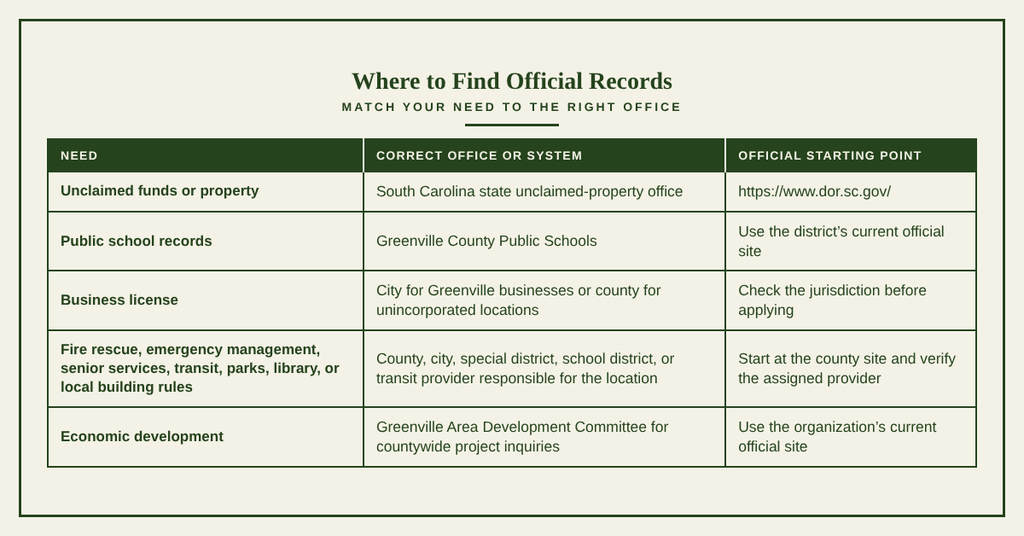
Records by Department
Use the record holder’s current website rather than a private aggregator that combines unrelated databases. The following routing table covers common searches and nearby state services.
County Government
County government offices divide legal work among courts, elected officials, administrators, recorders, tax staff, and enforcement agencies. A filing sent to the wrong office may lose time while staff transfer it. Identify the legal function before choosing the address or online system.
County Clerk and District Clerk
The Greenville County Clerk of Court handles many county-level court filings and marriage-license matters. A case in the United States District Court for the District of South Carolina belongs to the federal district clerk, not the county clerk. The court name printed on the filing or summons determines the proper clerk.
County Auditor and Tax Office
The county auditor or assessor maintains property appraisal and assessment records used to prepare the tax roll. Tax collection and payment may fall under the county treasurer or a separate collections division. A tax balance, an assessed value, and a recorded deed should be checked in their separate systems.
Sheriff’s Office
The sheriff’s office operates the detention center, employs deputy sheriffs, serves legal papers, and performs assigned court-security duties. It also handles warrant service and sheriff-created reports. Court filings stay with the clerk of court, so the sheriff portal does not replace a civil, family, or probate case search.
County Judge, Council, and Courts
Greenville County Council serves as the county’s elected legislative body, while the probate judge handles assigned estate matters. Magistrate courts handle certain cases within their legal range, and municipal courts operate inside city boundaries. A case location and charge determine which court has authority.
Elections and Voter Registration
Voter registration, polling-place lookup, absentee-vote requests, and election dates belong with the county elections commission. Registration deadlines and ballot rules can change before each election, so rely on the current scvotes.gov calendar. Property, tax, or criminal records do not prove current voter registration.
GIS and Interactive Maps
GIS maps combine property parcels, addresses, assessment data, roads, and other public layers. The map presents the county’s recorded and maintained data in a visual form. It does not replace the assessor’s parcel record, the recording office’s deed, or the elections commission’s precinct record.
Property and Parcel Boundary Maps
A parcel map can show an address, parcel number, owner field, building footprint, and assessed land area. Tax boundaries may follow large or irregular shapes rather than visible fences or property markers. For exact lines, easements, or encroachments, use a recorded plat, deed description, or licensed survey.
Precinct and Voting District Maps
Precinct and voting-district maps help voters check where they vote and which election districts cover an address. Election officials control the legal district lines and polling assignments after each applicable change. Use the elections commission for the current voting map instead of estimating boundaries from a general parcel map.
Unclaimed Funds and Property
Unclaimed funds and property are handled through the South Carolina state unclaimed-property system rather than the county sheriff or tax office. State holdings may include checks, payroll items, securities, safe-deposit interest, or other eligible property. The state office uses legal names and transaction data to match a claimant.
Unclaimed Property Search
Search the state unclaimed-property database with the owner’s exact legal name and any known city, county, or transaction detail. Spelled-out names, abbreviations, and business-name changes can create separate results. Review the state’s free search page rather than sending personal data to an unverified private claimant.
How to Claim Unclaimed Funds
After finding a listed claim, follow the state office’s current claim form and document instructions. Proof may establish identity, ownership, or the connection to the lost property. State law sets filing periods and claim conditions, so file directly with the state before any deadline and avoid paying a private company to submit a basic claim.
Contact Details
Use the following county contact details when you need help with the sheriff search portal.
Frequently Asked Questions
Find quick answers about common requests in Greenville County SC, from court locations to voter registration.
Where is the Greenville County SC courthouse?
The main courthouse sits at 4 McGee Street in downtown Greenville. It houses the circuit court, probate court, and clerk’s office. Public parking is available nearby, and the building is open Monday through Friday, 8:30 AM to 5:00 PM. Security screening occurs at the entrance, so allow extra time for checks. For specific case files or court calendars, call the clerk’s desk at (864) 271‑5210.
How can I search the jail inmate list?
Visit the Greenville County Sheriff’s Office portal to run an inmate search. Enter the person’s name or booking number, then review details such as charges, bond amount, and release date. The site updates daily, reflecting the latest custody information. If online results are unclear, call the jail’s information line at (864) 271‑5210 during business hours for assistance.
What does the Greenville County tax assessor do?
The tax assessor’s office calculates property values for local taxes and maintains records of ownership, land parcels, and improvements. Residents can request a property valuation, view tax bills, or file an appeal for reassessment. Services are offered in person at the assessor’s building on McGee Street, by phone, or through the online portal during regular office hours.
How to find Greenville County property records online?
Start at the county’s official website and select the “Property Records” link. You can search by address, parcel number, or owner name. Results include legal descriptions, tax information, and recorded deeds. The system updates weekly, so recent transactions appear promptly. For detailed copies or historical data, contact the recorder’s office at the listed phone number.
Where can I register to vote in Greenville County SC?
Voter registration is handled by the County Elections Office located at 4 McGee Street. Forms are available online, at the office, or at public libraries. Complete the form, provide a valid ID, and submit it in person or mail it to the address above. Registration closes 30 days before an election, so plan ahead to ensure your ballot arrives on time.